All perl lovers - please check perlsecret. It's fun and worth reading. I liked operator called Kite or ... sperm, which looks like
"~~<>". :)
понедельник, 25 июня 2012 г.

понедельник, 18 июня 2012 г.
Why Privacy Matters Even if You Have 'Nothing to Hide'
Maybe you heard such opinion about privacy before - "I've got nothing to hide. Only if you're doing something wrong should you worry, and then you don't deserve to keep it private."
You can check this intresting article about this matter, why this logic is false.
воскресенье, 10 июня 2012 г.
Password cracking, again
I've been intrested in IT security, cryptoigraphy and password security long time ago, I even made presentation about password security on PerlMova 2010 (sorry, slides in Russian only). So, I was curious, what's new things happened in this area - LinkedIn password hash leak, and Lastfm / Eharmony hash leak shortly after it. In both cases non-salted hashes was used (I'm sorry, but it's totall f*cked up) - LinkedIn uses sha1 and md5 was used in Lastfm! (no hashes was shown in second case, but 95% of all hashes was bruted for 1 year afterb leak).
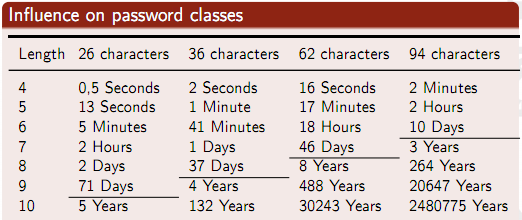
What we can do? Of course, we need to use special thing for password hashing - bcrypt, scrypt or PBKDF2 - many of them already implemented on many programming languages now.
Also you can see very good presentation from PHDays 2012 conference by also famous security resercher Alexander Peslyak aka Solar Designer - wind up video up to 14:00:00 (sorry, but presentation on Russian only, but you can check slides).
понедельник, 4 июня 2012 г.
(Unix) System administrator leveling matrix
System administrator leveling matrix - https://docs.google.com/spreadsheet/pub?key=0Aorral4Vq792dDd1cnMySFB3QWhPXzJ1R3B5cWdmSXc&output=html
I think, I have level 70-80 for all categories, nice. :)

I think, I have level 70-80 for all categories, nice. :)

понедельник, 9 апреля 2012 г.
Couple of intresting tools
Couple of intresting links below -
1. Logstash - http://logstash.net/ - Powerfull log processor. Takes logs from many sources, applies many filters and provides output. One of many outputs can be ElasticSearch-cluster, with fancy webfrontend for searching, also many plugins exists (for amqp, greylog2, graphite, etc). This tool is similar to Splunk, maybe it's not cool as Splunk is - but for free (Splunk price is not for fainted of heart).
2. Varnish Book - "From creators of Varnish". :) PDF and epub will be soon.
пятница, 16 марта 2012 г.
Why server is so slow? - Use "The USE Method" !
I'm excited!
I've just found fabulous posts in DTrace blog -
1. The USE Method - http://dtrace.org/blogs/brendan/2012/02/29/the-use-method/
2. The USE Method: Solaris checklist - http://dtrace.org/blogs/brendan/2012/03/01/the-use-method-solaris-performance-checklist/
3. The USE Method: Linux checklist - http://dtrace.org/blogs/brendan/2012/03/07/the-use-method-linux-performance-checklist/
At glance - it's about method of checking system performance problem - USE (utilization, saturation, errors) method. In case of server system we have different resources - CPU, memory, storage, network etc.
For each resource we check
- utilization: the average time that the resource was busy servicing work
- saturation: the degree to which the resource has extra work which it can’t service, often queued
- errors: the count of error events
Usually we need to check for errors first, then utilization and saturation after this. But it's really short explanation - I beg you to check original posts. :) In next two posts Brendan provides recomendations with lists of commands for Solaris and Linux for using USE method.
And USE method is usable even without dtrace - Linux do not have native dtrace, and authors of original Dtrace blames current versions of Linux dtrace very hard. :)
воскресенье, 4 марта 2012 г.
Perl is on Heroku now !
Russian link is here.
Recently I found some amazing trick - you can use your favourite web-platform on Heroku! It can be possible using special feature called buildpacks. Of course, Perl is supported too - Miyagawa yourself wrote buildpack for PSGI/Starman application deployment - https://github.com/miyagawa/heroku-buildpack-perl :)
So, I've decided to move my Plusfeed.pl application to Heroku - because Stackato's trial period is over now. Also some annoying bug was also fixed - I've change ID of message to URL instead of Etag and now message will not go up in RSS feed after adding comment or +1. :(
Instruction below -
1. Please create Makefile.PL for your application (see ExtUtils::MakeMaker for its format)
use strict;
use warnings;
use ExtUtils::MakeMaker;
WriteMakefile(
NAME => 'plusfeed.pl',
VERSION => '0.05',
AUTHOR => 'Denis Zhdanov ',
EXE_FILES => ['app.psgi'],
PREREQ_PM => {
'Google::Plus' => '0.004',
'XML::RSS' => '1.49',
'XML::Atom::SimpleFeed' => '0.86',
'Plack::App::Path::Router' => '0',
'Plack::App::File' => '0',
'Plack::Builder' => '0',
'Path::Router' => '0.11',
'CHI' => '0.5',
'Starman' => '0.3',
},
test => {TESTS => 't/*.t'}
);
2. Add your app to Heroku using custom buildpack -
git init
git add .
git commit -m "Initial version"
heroku create --stack cedar --buildpack \ http://github.com/miyagawa/heroku-buildpack-perl.git
git push heroku master
git add .
git commit -m "Initial version"
heroku create
git push heroku master
All magic is in this buildpack line (of course, change to the name of your application).
You will get something like
-----> Heroku receiving push
-----> Fetching custom buildpack... done
-----> Perl/PSGI app detected
-----> Installing dependencies
-----> Installing Starman
Starman is up to date. (0.3000)
-----> Discovering process types
Procfile declares types -> (none)
Default types for Perl/PSGI -> web
-----> Compiled slug size is 6.8MB
-----> Launching... done, v7
http://plusfeed-pl.herokuapp.com deployed to Heroku
(In the first time you will get much more lines with installation of cpanm and all dependencies, but not for update).
Thats all, folks! Your app is up and running.
My app lives on http://plusfeed-pl.herokuapp.com now.
Подписаться на:
Сообщения (Atom)